Soft-FPGA-TD4

- 2025/10/30 ブレッドボード図を追加しました。
- Fritzingで作成しました。

- 2025/10/28
0.1alphaリリースしました。 - 2025/10/25 まだ編集中ですが
- ビルド手順を書きました。
- git cloneしてビルドできるはず。
- Verilogで実装したシンプルな4bit CPU TD4をverilatorでC++ソースへ変換し、
Raspberry Pi Pico2上で動作するようにしました。 - FPGAは不要 です。pico2のみで動きます。
- ハードウェアFPGAなしでverilogソースが動く!だから
soft-FPGAです。 soft-FPGAはSoftware Defined FPGAの略です。
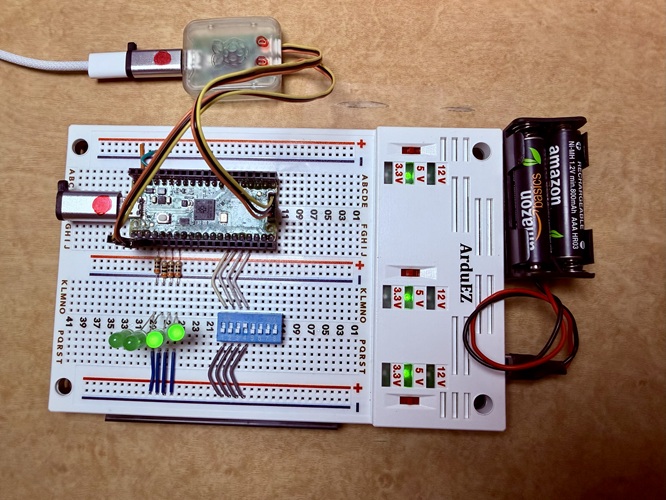
開発環境
- 開発環境インストールの詳細手順
- Windows11
- VSCode
pico SDKVSCode拡張
- MSYS2 UCRT64
- verilator 5
- VSCode
- Windows11
soft-FPGAビルド手順
- git cloneでファイル取得
- WSL2 Ubuntu24で実行する場合はWindowsからわかりやすいディレクトリ上で実行すると良い。
- 例:WSL2 Ubuntu24の
/mnt/c/pico2はWindowsのC:\pico2\
- 例:WSL2 Ubuntu24の
git clone https://github.com/open-tommie/Soft-FPGA-TD4.git - WSL2 Ubuntu24で実行する場合はWindowsからわかりやすいディレクトリ上で実行すると良い。
-
Windows11: ファイルエクスプローラでクローンしたSoft-FPGA-TD4フォルダーを開き、
VSVodeワークスペースファイルをダブルクリック./Soft-FPGA-TD4/verilator-TD4/02-verilater-TD4.code-workspace -
VSCode: 右下の
□ Compileアイコンをクリックしてビルドする。成功すると以下のようなログを出力する。[101/101] Linking CXX executable test.elf * Terminal will be reused by tasks, press any key to close it. -
VSCode: buildフォルダーに
test.uf2が作成されたことを確認する。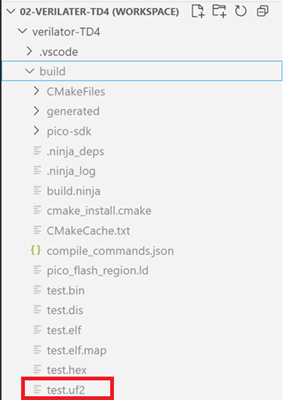
- UF2ファイルをpico2で実行する:
- pico2の
BOOTSELボタンを押したまま、USBケーブルでPCと接続します。 - 接続後、
BOOTSELボタンを離します。- PC側で、Pico 2が マスストレージデバイス(RPI-RP2) として認識されます。
- 認識されない場合: ケーブルを抜き、再び
BOOTSELを押しながら接続を試してください。
- UF2ファイルをコピー
- UF2ファイルを、RPI-RP2ドライブにドラッグアンドドロップします。
- コピーが完了すると、Pico2が自動的にリブートします。
- pico2の
(TBD)
- リブートすると4秒後にLEDが点滅します
- TeraTermでログ出力を確認
verilatorでverilogをC++変換
(TBD)
MSYS2 UCRT64でシェルスクリプトを実行します。- do-varilator.sh
- ./obj_dirにC++ソースを出力します。
- main.cppは出力しない
- 実行例:
tommie@PC40-UCRT64:/c/pico2/Soft-FPGA-TD4/verilator-TD4$ ./do-verilator.sh
#!/bin/bash -v
# Verilatorを使ってVerilogコードをC++に変換
#
# MSYS2 UCRT64環境で実行することを想定
# 実行方法: ./do-verilator.sh

verilator --no-timing --cc TD4.v --exe main.cpp --top-module TD4 --threads 1 --threads-dpi none -o VTD4_sim
- V e r i l a t i o n   R e p o r t: Verilator 5.040 2025-08-30 rev UNKNOWN.REV
- Verilator: Built from 0.000 MB sources in 0 modules, into 0.000 MB in 0 C++ files needing 0.000 MB
- Verilator: Walltime 0.002 s (elab=0.000, cvt=0.000, bld=0.000); cpu 0.000 s on 1 threads; alloced 5.172 MB
Debug Probeで書き込み
(TBD)
- 書き込み
- ログの確認
pico2接続
(TBD)
解説
- verilator公式マニュアル(英文)
- verilatorで変換したC++ソースはLinux向けになっています。
- そのままではpico2 SDK C++ではコンパイルエラーがでます。
- エラーがでないようにして、pico2で実行できるようにしました。
- TD4 verilogソース
- TD4.v
- fork元のsimpleTD4を修正して使っています。
- fork元の解説が充実しているので是非、参照して下さい。
- simpleTD4
- Verilogで実装したシンプルな4bit CPU TD4の実装。
- Sipeed Tang Nano で動作。
- TD4_details_jp.md にTD4.vの解説があります。
- simpleTD4
- main.cpp
- main.cppの処理概要は以下の通りです。
- pico2のGPIOを初期化
- DIP SWの値をTD4:IN_PORTレジスタへ設定
- TD4クロック実行
- TD4:OUT_PORTをLEDへ出力
topはverilatorが出力するTD4.vのモデルインスタンス- verilogシミュレーション用のインスタンス
- 以下を繰り返す
- DIPスイッチの値をIN_PORTレジスタへ設定する
- 4bit DIPスイッチの状態をpico2のGPIOから読む
- GPIOの値をtop->in_port(IN_PORTレジスタ)へ設定する
- top->eval(): 評価:TD4の状態を更新する
- OUT_PORTレジスタの値をLEDへ出力する
- top->out_port(OUT_PORTレジスタ)の値をpico2のGIPOでLEDへ出力する
- top->clock = !top->clock: クロックを反転する
- sleep: 時間まち
- DIPスイッチの値をIN_PORTレジスタへ設定する
- top->eval()の処理時間はデバッグ出力なしで6μ秒ぐらい
- 逆算すると、TD4の最大クロック周波数は50kHzぐらいの見込み。
- デバッグ文を出力すると遅くなる
- GPIOで遅くなる。
- main.cppの処理概要は以下の通りです。
FAQ
Q1-verilator出力のC++ソースを修正する必要あるか?
- A: ありません。
メモ、雑感